Resource Hub
Complete Guide to Deploying AI Applications
Everything you need to take an AI-built app from your laptop to a reliable production deployment.
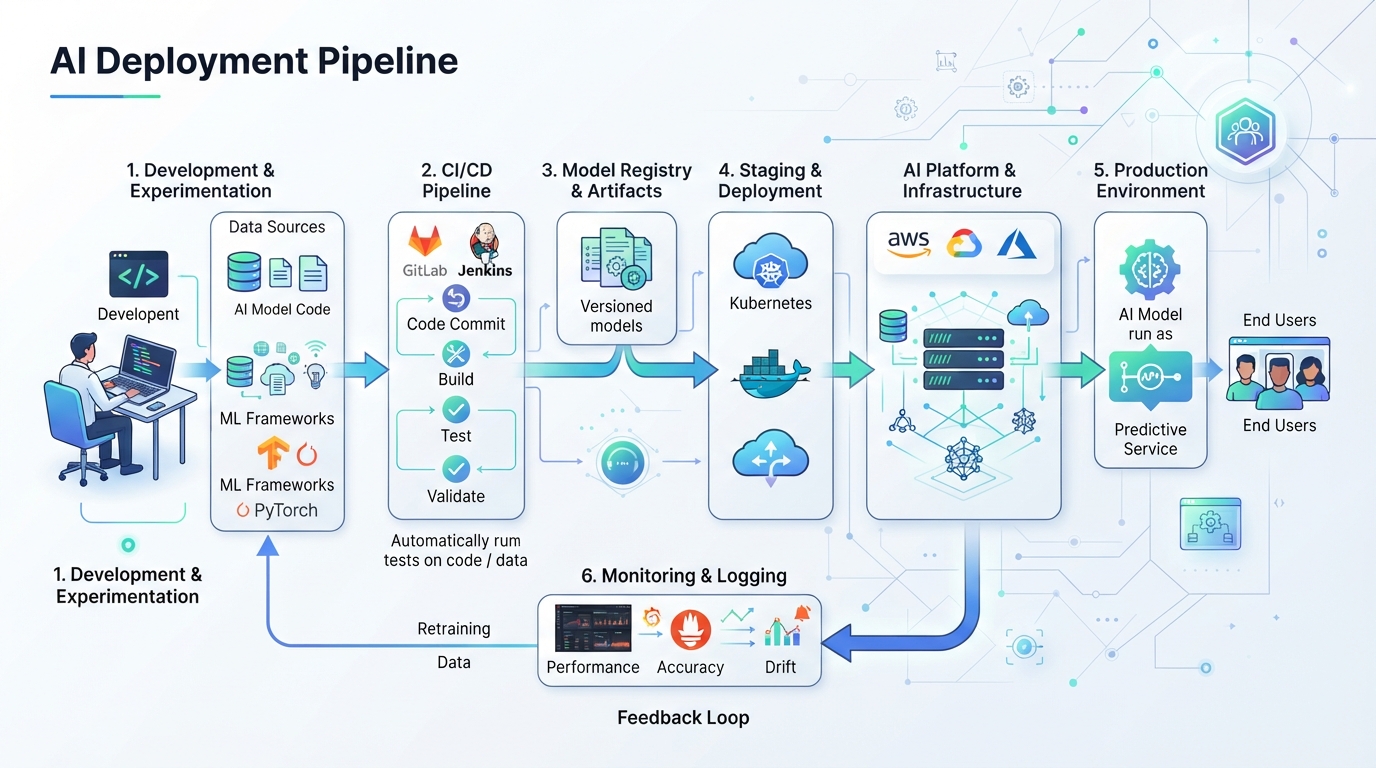
Deploying AI applications involves more than just moving code from your development environment to production. It's a complex process that requires careful planning and a strategic approach. This guide aims to demystify the deployment of AI-built applications by breaking down the steps and considerations necessary for a successful transition from local development to live production.
Understanding the fundamentals of deployment environments, setting up efficient pipelines, and navigating common pitfalls are crucial for a smooth deployment experience. Moreover, leveraging platform-specific tools and maintaining ongoing performance monitoring can significantly enhance the reliability and efficiency of your AI applications.
Whether you're new to deploying AI apps or looking to refine your current process, this guide provides a comprehensive overview that covers everything from choosing the right deployment environment to ensuring optimal performance post-deployment.
Understanding AI Deployment Environments
The success of deploying AI applications hinges largely on selecting the appropriate environment. Typically, these environments include local, staging, and production setups. Each serves a distinct purpose: local environments are ideal for initial development and testing, staging environments mimic production settings to test real-world performance, and production environments host the live application for end-users.
Choosing the right environment depends on various factors, such as the complexity of the application and the expected user load. Each environment must be configured appropriately to support the unique requirements of AI applications, which often involve substantial computational needs and integration with AI models.
- Local environments: Ideal for initial development and testing.
- Staging environments: Replicate production settings for pre-live testing.
- Production environments: Host live applications for user access.
- Environment choice affects performance and stability.
- Consider computational and model integration needs.
Setting Up an Efficient Deployment Pipeline
An efficient deployment pipeline is the backbone of a successful AI application deployment. This pipeline should incorporate Continuous Integration and Continuous Deployment (CI/CD) practices, which automate the testing and deployment process, reducing the risk of human error and speeding up the release cycle.
Integrating automated testing ensures that AI applications meet quality standards before they reach production. This involves setting up automated scripts that test the application’s functionality and performance at every stage, catching issues early and keeping deployments efficient and reliable.
- Implement CI/CD practices to automate deployments.
- Use automated testing to maintain application quality.
- Incorporate scripts for functionality and performance tests.
- Catch issues early to ensure reliable releases.
- Streamline the release cycle with automated processes.
Common Deployment Pitfalls and Solutions
Deploying AI applications can present several challenges, from integration issues to handling model dependencies. A common pitfall is underestimating the complexity of integrating AI models into the deployment environment, which can lead to performance bottlenecks or incompatibility issues.
Another frequent problem is the misconfiguration of environments, which can cause unexpected behavior in production. Solutions include thorough pre-deployment testing and robust logging to diagnose issues quickly. Ensuring compatibility between development tools and the deployment environment is also crucial.
- Integration issues with AI models.
- Performance bottlenecks due to model dependencies.
- Misconfiguration of deployment environments.
- Use thorough testing and logging for quick diagnostics.
- Ensure tool compatibility across environments.
Leveraging Platform-Specific Tools for AI Apps
Choosing the right platform for hosting AI applications can significantly impact deployment success. Platforms such as AWS, Google Cloud, and Azure offer specialized tools and services designed for AI workloads, including machine learning model hosting and data processing capabilities.
Containerization options like Docker and Kubernetes provide flexibility and efficiency by allowing applications to run consistently across different environments. These tools help manage dependencies and scalability, ensuring that AI applications perform optimally regardless of the deployment scenario.
Performance Monitoring Post-Deployment
Once an AI application is deployed, ongoing performance monitoring is essential to maintain stability and efficiency. Tools like Prometheus and Grafana offer insights into application metrics, helping identify performance trends and potential issues before they affect users.
Regular monitoring allows for proactive adjustments and optimizations, ensuring that the application continues to meet performance expectations. This vigilance helps in maintaining a seamless user experience and facilitates quick responses to any emerging challenges.
- Use tools like Prometheus and Grafana for monitoring.
- Identify performance trends with detailed metrics.
- Maintain stability through proactive adjustments.
- Ensure seamless user experience with regular checks.
- Facilitate quick responses to emerging issues.
Related services
- AI Deployment & DevOps ServicesIt works on your machine but not in the cloud. We build the deployment pipeline, environments, and monitoring your AI-built app was missing.
- Hosting & Cloud Infrastructure ServicesWrong host, surprise bills, or a server that keeps falling over. We design and run hosting that fits your app and your budget.
Common problems
- My AI App Won't DeployIt runs perfectly on your machine and dies the moment you try to ship it. We find out why and get it live.
- Fix a Vercel Deployment FailureRed build logs, failed deployments, and cryptic Vercel errors. We get your build passing and your app live.
- Resolve Cloud Run Deployment ErrorsContainer failed to start, wrong port, or a crash on deploy. We get your service running on Google Cloud Run.
Blog categories
More resources
Want us to handle it for you?
Reading is useful, but if you would rather have experts fix it, we are one message away.